Transpose
| Block Group: | Table Operations |
| Icon: |  |
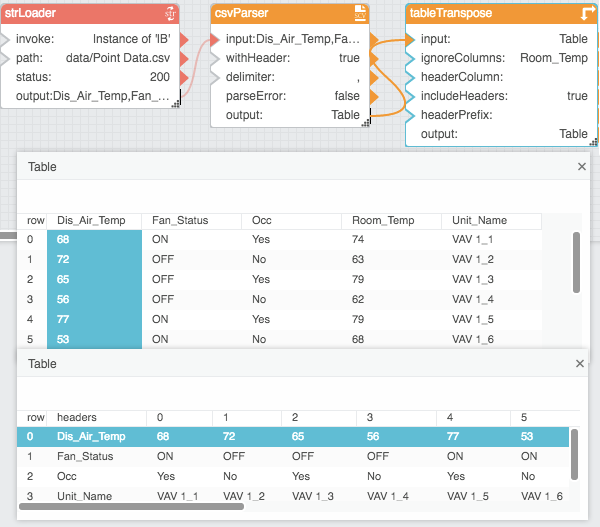
The Transpose block returns a new table that transposes the input table, so that the columns in the input table are rows in the output table. Optionally, you can set columns to omit from the output. You can also set an input column to be the header row of the output table.
For information on using dataflow blocks, see Dataflow.
For answers to some common questions about working with tables, see Tables.
Input/Output Properties
The following properties of the Transpose block can take input and give output.
- input (table)
- ignoreColumns (string)
- headerColumn (string)
- includeHeaders (boolean)
- headerPrefix (string)
input receives the table that you want to transpose.
ignoreColumns specifies the names of columns in the input table to ignore when transposing, as comma-separated values.
headerColumn specifies the column from the input table to use as headers in the output table. This column is not included in the transposed data.
includeHeaders specifies whether the input table's column names are included in the output table, as a first column named headers.
headerPrefix specifies the text string to include before the column number, for each column header in the output table. Columns are numbered from 0. The headerPrefix property works only when headerColumn is empty or does not exist in the input table.
Output Property
The following property of the Transpose block can give output but cannot take input.
- output (table)
output returns the transposed table.
Example
The following image shows an example of the Transpose block.