Property Options Menu
The Property Options Menu displays the options relevant to a specific property such as bindings, help, and more. These options are different from options available in the main menu options in the menu bar.
To show the Property Options Menu:
- Hover over a property until a blue dot appears.
- Click the blue dot.

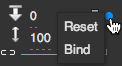
Viewing the Property Options Menu for a property