Layer Properties

These properties affect the layer component.
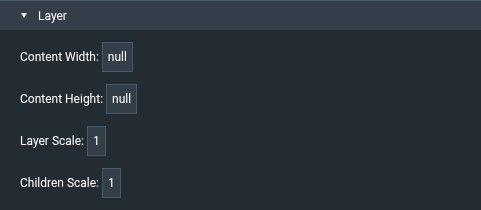
Layer properties

For a guide to using layers, see Layer.

A layer always fills its parent, so the Position and Size, Transform, Fill and Stroke, Corners, Effects, Callout, Layout, Scaling, and Repeater sections are not shown for layers. The general properties, such as visibility, still apply. See Common Properties.

Content Width

Content Width

Content Width
The content width of the layer's parent (usually the page). Editing this value changes the Content Width scaling property of the parent, which is shared by all layers in that parent.

Content Height

Content Height

Content Height
The content height of the layer's parent (usually the page). Editing this value changes the Content Height scaling property of the parent, which is shared by all layers in that parent.

Layer Scale

Layer Scale

Layer Scale
Scales the whole layer and its content by setting the layer's Scale X and Scale Y. The default is 1. The minimum is 0.1. The layer size is adjusted so that the scaled layer still covers its parent. For example, at a scale of 2 the layer is 50% of the parent's size before scaling.

Children Scale

Children Scale

Children Scale
Sets the scale of every component in the layer. The default is 1. Changing this value in the Property Inspector sets Scale X and Scale Y of all components currently in the layer.

If the layer's childrenScale property is set (for example in the Advanced Properties panel), components that you insert into the layer also get that scale.