Table of Contents
Date Format
| Block Group: | Date Time Operations |
| Icon: |  |
The Date Format block reformats a date and time string using the defined format. This block also converts a serial number to a date and time string.
For information on using dataflow blocks, see Dataflow.
Input/Output Properties
The following properties of the Date Format block can take input and give output.
- input (number or string)
- format (string)
- timezone (enum or string)
input The serial number or any supported date time string as outlined here. This can also be a string from which a date can be parsed.
format The date and time formatting string. For example, you can format the date to be displayed as "Mon, Jan 5, 2015" by using this format string: "E, MMM d, yyyy". If format contains xxx, it is replaced by the time zone offset (for example +08:00). If format is empty, output is null.
timezone (hidden in the block by default; set it in the Properties panel) specifies the time zone used for the output. The default is local.
- local: The date is shown in the local time zone of the browser.
- auto: If the input string ends with a time zone offset (for example
2016-06-14T08:00:00-07:00), the date and time are shown as written in that time zone. - A time zone offset string such as
+08:00or-05:00: The date is converted to that time zone.
Output Property
The following property of the Date Format block can give output but cannot take input.
- output (string)
output returns a date and time string created from the specified input string and format.
Examples
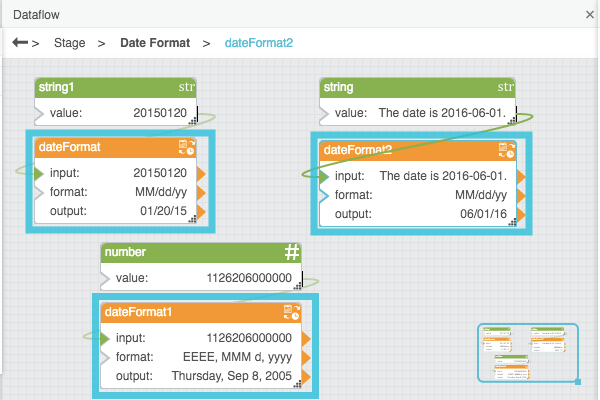
The following image shows three examples of the Date Format block. The top left Date Format block translates a date string from one format to another format. The top right Date Format block extracts a date string from text and also reformats the date string. The bottommost Date Format block creates a date and time string from a sequential serial number.