Table of Contents
Table to JSON String
| Block Group: | Table Operations |
| Icon: | no icon |
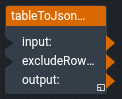
The Table to JSON String block takes an input table and returns the table as a JSON string. The JSON string is an array that contains one object for each table row. Each object maps column names to the cell values of that row.
The result is the same as the script JSON.stringify(tableGetRows(table, "object")).
For information on using dataflow blocks, see Dataflow.
For answers to some common questions about working with tables, see Tables.
Input/Output Properties
The following properties of the Table to JSON String block can take input and give output.
- input (table)
- excludeRowColumn (boolean)
input receives the table that you want to convert to a JSON string.
excludeRowColumn specifies whether to leave out the row column. The default is FALSE.
- TRUE: The objects do not contain the
rowcolumn. - FALSE: The objects contain the
rowcolumn.
Output Property
The following property of the Table to JSON String block can give output but cannot take input.
- output (string)
output returns the JSON string. For example, a table with the columns name and value and excludeRowColumn set to TRUE returns a string like this:
[{"name":"a","value":1},{"name":"b","value":2}]
If input is not a table, output is null.