Table of Contents
Round
| Block Group: | Number Formatting |
| Icon: |  |
The Round block rounds a number to a specified precision.
For information on using dataflow blocks, see Dataflow.
For accepted and excluded arguments of Number Formatting blocks, see Number Formatting.
Input/Output Properties
The following properties of the Round block can take input and give output.
- input (number)
- precision (number)
- minPrecision (number)
input specifies any real number that you want to round.
precision specifies the number of digits after the decimal to round the number to. A value of 0, less than 0, or null rounds the number to the nearest integer. This property is not shown on the block itself; set it in the block property inspector (the right-hand panel of the dataflow window) or bind to it.
minPrecision specifies the minimum number of digits after the decimal. When minPrecision is less than precision, trailing zeros are removed from the result until minPrecision digits remain. If minPrecision is null, it is the same as precision, and no zeros are removed. This property is also set in the block property inspector.
Output Property
The following property of the Round block can give output but cannot take input.
- output (number or string)
output returns the rounded number. If precision is greater than 0, output returns the number as a string with exactly precision digits after the decimal (or fewer, if minPrecision is set). For example, 2.5 with a precision of 2 returns "2.50".
Examples
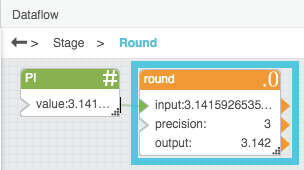
The following image shows an example of the Round block. In this example, pi is rounded to a precision of three digits.