Table of Contents
Page Model
A script runs inside the DGLux5 page model: the tree of components, dataflow blocks, and their properties. This page explains how a script finds other elements, reads and sets their properties, creates bindings, and receives values from the block that runs it.
Topics on this page:
See also: Model functions for functions that add, remove, find, and inspect page model objects.
@ Names
Names that start with @ refer to the page model:
| Name | Refers to |
|---|---|
@ | The block that runs the script, for example the Script block itself. |
@parent | The logical parent of the current block or element. Repeat it to go further up: @parent.@parent. |
@stage | The root of the nearest stage. In a page, this is the page root. In a symbol, it is the symbol root. |
@params | The parameters of a symbol. In the root dataflow of a symbol, @parent.@params refers to the parameters of this symbol. |
@lib | The root of the Project Dataflow. |
@name | The page model name of an element, as a string. |
You can use @ names on their own, such as @parent, or after a dot, such as @parent.@parent or x.@name.
To refer to a child element, use its page model name after a dot. For example, if the parent dataflow contains a String block named string, use @parent.string. To read its value property, use @parent.string.value. To reach a component in a group, use a path such as @stage.group1.shape1.width.
The same paths are used in bindings. In a binding, @parent.table.0_v1 refers to the cell in row 0, column v1, of a table that shares the parent of the current block.
How to See and Change Page Model Names
See the Page Model Name
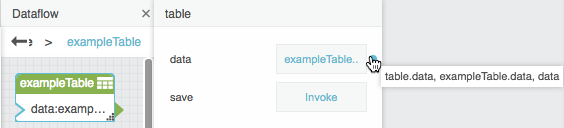
To view the page model name of any property and of its parent:
- Hover over the property until a blue dot appears.
Hold Option and right-click the blue dot.
A tooltip shows:
- the parent element type and property name;
- the parent element name in page model syntax and the property name;
- the property name.

Change the Page Model Name
- Double-click the element name in the Outline or in the dataflow block header.
- Type the new name.
- Press Command + Enter (Mac) or Ctrl + Enter (Windows).
If you press only Enter, the name changes in the user interface but not in the page model.
Important
Changing the page model name of an element breaks scripts and bindings that use the old name. Update them to the new name.
Reading Values
Read a property with a dot or with brackets:
// The "a" property of this Script block
var a = @.a;

// The value of a String block named "string" in the same dataflow
var s = @parent.string.value;

// Brackets work too; use them when the name is in a variable
var field = "value";
var s2 = @parent.string[field];
A property that does not exist reads as null. Reading a property of null is an error ("can not access … of null"), so check intermediate objects when you are not sure they exist:
var block = @parent.string;
if (block != null) {
  return block.value;
}
return "no block named string";
The following example adds a value to a property of the Script block and reads it back. It does not need any other element on the page.
@.a = 5;
return @.a * 2;   // 10
typeof of a page model object returns its type:
return typeof @; // "script"
To read the value that a component shows in the view (instead of its model property), use dgGetViewValue. See Model functions.
Setting Values: = and ~=
| Syntax | Effect |
|---|---|
target.prop = value | Sets the runtime value. The value is not saved with the page. If the property has a binding, the binding stays and can overwrite the value later. |
target.prop ~= value | Sets the value so that it is saved the next time the page is saved, like typing it in the Properties panel. |
target.prop ~= ['path'] | Creates a saved binding. See bindings. |
// Runtime value, not saved
@parent.string.value = "stringValue";

// Saved value
@parent.string.value ~= "stringValue";
~= only works on page model properties. Using it on a variable, a list item, or an object created in the script is an error.
Creating and Removing Bindings
To create a binding, use ~= with a list that contains exactly one string: the binding path. The path is relative to the object that owns the target property.
// Bind the parent's width to the parent's height
@parent.width ~= ['height'];

// Bind one block's value to another block's value
@parent.string.value ~= ['@parent.input.value'];
To remove a binding, use ~= with any other list, for example an empty list:
@parent.string.value ~= [];
To read the binding of a property, use modelGetBinding. See Model functions.
Example
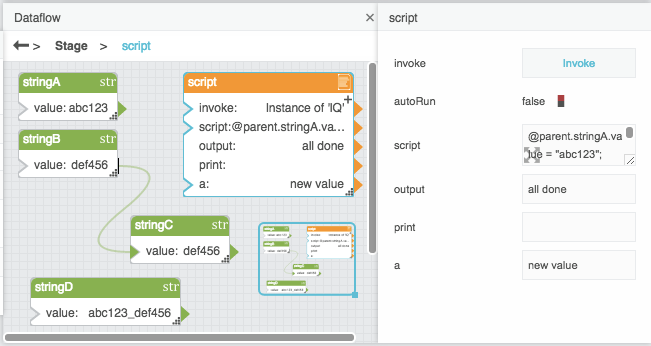
The following image shows a dataflow before a script runs. The script sets values, creates a binding, and returns an output value.

The script:
@parent.stringA.value = "abc123";
@parent.stringB.value = "def456";
@parent.stringC.value ~= ['@parent.stringB.value'];
@parent.stringD.value ~= @parent.stringA.value + "_" + @parent.stringB.value;
return "all done";
The same dataflow after the script runs:
Traversing the Page Model
Use loops with @parent to walk up the tree. The following example searches the parent, then the parent's parent, and so on, until it finds a symbol.
var searchObject = @parent;
while (searchObject != null && typeof searchObject != 'symbol') {
  searchObject = searchObject.@parent;
}

if (searchObject != null) {
  // found the symbol; use it here
}
For more powerful searches, see modelFindParent, modelIterateChildren, and modelGetFields in Model functions.
Context Variables
Depending on where a script runs, these variables are available:
| Variable | Available in | Value |
|---|---|---|
$params | A Script block called as a function or with scriptRun | List of the arguments. See Reusing a script. |
$ | A Script block called as a function or with scriptRun | The object the script was called on (the caller). |
$ | Filter, Column Mapping, Edit Rows, Remove Rows | An empty object, created once per run and shared by all rows. Use it to keep values from row to row, such as a running total. |
| Column names | Filter, Column Mapping, Edit Rows, Remove Rows | The value of that column in the current row, for example v1. |
$thisRow | Filter, Column Mapping, Edit Rows, Remove Rows | The current row. Use $thisRow['column name'] when the column name is not a valid script name, for example when it contains a space or starts with a digit. |
$rowResult | Column Mapping | The object that receives the new column values of the current row. |
$json | JSON Parser (selector) | The parsed JSON input. The selector path is evaluated as a script on $json. |
When a Script block runs normally (through invoke or autoRun), $params and $ are null.
Example for a Filter condition: keep rows where the text "History" appears in the Energy Usage column.
$thisRow['Energy Usage'].indexOf("History") > -1
Example for a Column Mapping from value: a running total of column v1. $ keeps the total between rows.
=$.total = ($.total == null ? 0 : $.total) + v1
For details of the table blocks, see Tables.
Reusing a Script
You can call a Script block like a function from another Script block, a Column Mapping block, or a Filter block. Inside the called script:
$paramsis the list of arguments;$is the object you called the script on (for@parent.myScript(…), it is@parent);@is still the called Script block, so@.areads its own properties;- the
returnvalue is the result of the call; printdoes nothing, and if an error occurs the call returns null. The error goes to the browser console.
The following example creates a script and calls it from a Script block and a Column Mapping block:
Set the script property of
multiplyAndAddto a script that multiplies two$paramsvalues and adds a property of the block:return $params[0] * $params[1] + @.a;
Add a property named a to
multiplyAndAddby clicking the plus sign, and set it to 1.- Add a second Script block, and change its name to
callFunction. Set the script property of
callFunctionto a script that callsmultiplyAndAdd:return @parent.multiplyAndAdd(2, 3);
callFunctionreturns 7.
- Add a Table block and a Column Mapping block.
- Bind the Table block value to the Column Mapping block input.
- For name 0, enter
v4. For from 0, enter a script that calls
multiplyAndAdd:=@parent.multiplyAndAdd(v1,v2)In each row, the new column contains v1 times v2 plus the value of a in
multiplyAndAdd.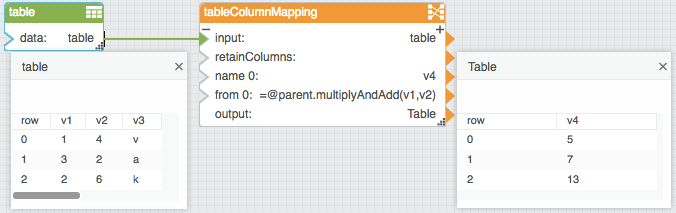
scriptRun
scriptRun(caller, scriptBlock, param1, param2, …)
Runs a Script block as a function, like scriptBlock(…), but lets you choose the caller.
- caller: the value that
$has inside the called script. - scriptBlock: a Script block, for example
@parent.multiplyAndAdd. - param1, param2, …: become
$params. - Returns the value that the called script returns, or null if
scriptBlockis not a Script block.
return scriptRun(@, @parent.multiplyAndAdd, 2, 3); // 7