Realtime Recorder
| Block Group: | Table Operations |
| Icon: |  |
The Realtime Recorder block monitors changes to specified values and creates a table to record current and historical values. Every time one of the monitored values changes, a row is added to the table with a timestamp and all of the values.
Realtime Recorder table contents are saved only in the current session.
For information on using dataflow blocks, see Dataflow.
For answers to some common questions about working with tables, see Tables.
Input/Output Properties
The following properties of the Realtime Recorder block can take input and give output.
- enabled (boolean)
- bufferSize (number)
- timeWindow (number)
- ignoreNullValue (boolean)
- reset (trigger)
- name n (string)
- value n
enabled determines whether the block is currently recording and creating a table. The default is TRUE.
bufferSize specifies the number of rows that the output table can hold. When the buffer is full, the oldest rows are deleted from memory. 0 (the default) means no limit. When you add this block from the palette, bufferSize is set to 1024.
timeWindow specifies, in seconds, how long rows are kept. Rows older than this are deleted when a new row is added. 0 (the default) means no limit.
ignoreNullValue specifies whether a change of a value n to null is ignored instead of being recorded.
ignoreNullValue and reset are hidden in the block by default. You can set them in the Properties panel.
reset clears the table. If a table with the same number of columns as the output table is passed to reset, the recorded rows are replaced by the rows of that table.
name n specifies a column name for the value n values in the output table. Every name n must be set; otherwise the output is null.
value n specifies a value to monitor and output in the output table.
Output Property
The following property of the Realtime Recorder block can give output but cannot take input.
- output (table)
output returns a table of timestamps (in a timestamp column) and values. The table contains a row for each monitored change.
Example
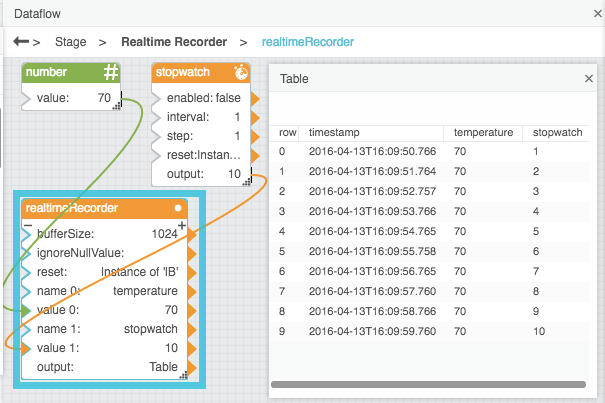
The following image shows an example of the Realtime Recorder block. In this example, a Realtime Recorder block is creating a table that monitors any changes to an input number and to a stopwatch value.