Select Columns
| Block Group: | Table Operations |
| Icon: |  |
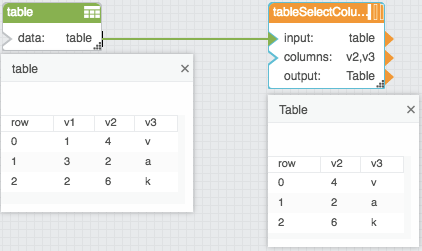
The Select Columns block returns a table that contains only the defined column names from the input table.
For information on using dataflow blocks, see Dataflow.
For answers to some common questions about working with tables, see Tables.
Input/Output Properties
The following properties of the Select Columns block can take input and give output.
- input (table)
- columns (string)
input receives the table from which you want to select columns.
columns specifies the columns in the input table to select, as comma-separated column names (for example v1,v3). Do not add spaces after the commas. Columns are returned in the order listed; names that do not exist are ignored.
Output Property
The following property of the Select Columns block can give output but cannot take input.
- output (table)
output returns a new table that contains only the specified columns.
Example
The following image demonstrates an example of the Select Columns block. In this example, two columns from the input table are selected.