Sort
| Block Group: | Table Operations |
| Icon: |  |
The Sort block returns a new table that reorders the input table’s rows.
For information on using dataflow blocks, see Dataflow.
For answers to some common questions about working with tables, see Tables.
Input/Output Properties
The following properties of the Sort block can take input and give output.
- input (table)
- column (string)
- method (enum)
- order (enum)
input receives the table that you want to sort.
column specifies the name of the table column to sort by.
method specifies how to compare values. The default is Number.
- Number: Values are compared as numbers. Values that are not numbers are placed at the end.
- String: Values are compared as strings (case-sensitive, character by character).
- Mixed: Values are compared as strings in natural order, ignoring case, so numbers inside text are compared by value (for example
item2comes beforeitem10).
Empty (null) values are always placed at the end.
order specifies whether to sort values in Ascending (default) or Descending order.
If column is empty or does not exist in the input table, the input table is returned unchanged.
Output Property
The following property of the Sort block can give output but cannot take input.
- output (table)
output returns the sorted table.
Example
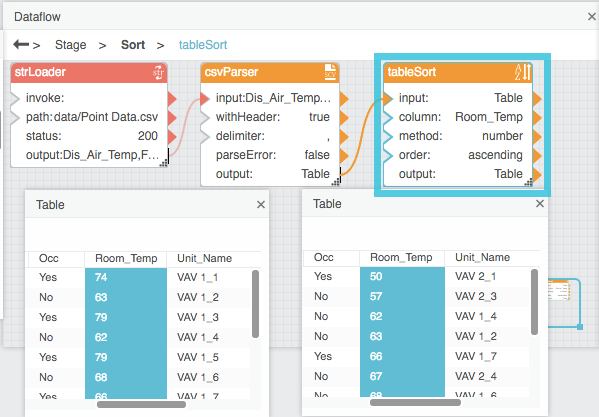
The following image shows an example of the Sort block. In this example, the Sort block reorders the table rows in ascending order based on the Room_Temp column.