Table of Contents
Geo-Location
| Block Group: | Browser API |
| Icon: |  |
Retrieves the user’s location (latitude, longitude, altitude, heading, and speed) from the browser's Geolocation API. The values update as the user's position changes.
For information on using dataflow blocks, see Dataflow.
Input/Output Properties
These properties can take input and give output.
- enabled (boolean)
- highAccuracy (boolean)
enabled specifies whether the block is currently collecting location data.
highAccuracy specifies whether to request the most accurate position available. The default is TRUE. Enabling this option might increase response time or power consumption. If several Geo-Location blocks are enabled and any of them has highAccuracy set to TRUE, high accuracy is used for all of them.
Output Properties
These properties can give output. They cannot take input.
- latitude (number)
- longitude (number)
- altitude (number)
- heading (number)
- speed (number)
- timestamp (number)
latitude returns the latitude of the user.
longitude returns the longitude of the user.
altitude returns the altitude in meters, relative to sea level, or null if the device cannot provide it.
heading returns the direction of travel in degrees clockwise from true north, or null if the device cannot provide it.
speed returns the speed in meters per second, or null if the device cannot provide it.
timestamp returns the time at which the position was retrieved, in milliseconds.
Model
This is a basic use of the block.
| Dataflow Model | Description |
|---|---|
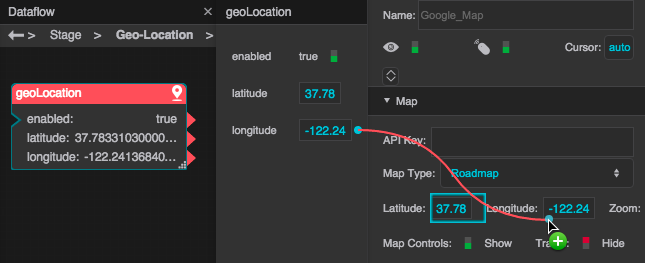 | The Geo-Location block's properties are bound to the Google Map component's properties, so the map will open with the user's location at its center. |