JSONP Loader
| Block Group: | Browser API |
| Icon: |  |
Retrieves JSONP data from the specified URL. A callback function must be defined at the URL.
For information on using dataflow blocks, see Dataflow.
Input/Output Properties
These properties can take input and give output.
- invoke (trigger)
- enabled (boolean)
- interval (number)
- autoRun (boolean)
- timeout (number)
- url (string)
- callback (string)
invoke causes the data to be loaded. Only works when enabled is set to TRUE.
enabled specifies whether the loader is active.
- TRUE: The JSONP data is retrieved as specified by invoke, interval, and autoRun.
- FALSE: Nothing happens when this block is invoked.
interval specifies how often the loader gets data, in seconds. The default value of 0 means that data is not reloaded periodically.
autoRun specifies whether the loader gets data automatically. Only works when enabled is set to TRUE. When you add this block from the palette, autoRun is TRUE.
- TRUE: The data is loaded every time url or callback changes. This includes the first time that the url property is populated.
- FALSE: The data is loaded only when the invoke property is triggered, or at the specified interval.
timeout specifies how long the loader will attempt to load the string before the request is canceled, in seconds. The default is 60.
url specifies the location of the JSON string. If url or callback is blank, nothing is loaded and output is cleared.
callback specifies the name of the callback function used to retrieve the data. This function must be defined at the URL. You might be able to copy the function name from the URL string, or you might need to find it at the URL.
Output Properties
These properties can give output. They cannot take input.
- loading (boolean)
- output (string)
- onComplete (event)
- error (string)
loading returns whether the block is currently loading data.
output returns the JSON string.
onComplete fires when the JSON string is loaded.
error returns the error message, if any. When an error occurs, output is cleared.
Model
This is a basic use of the block.
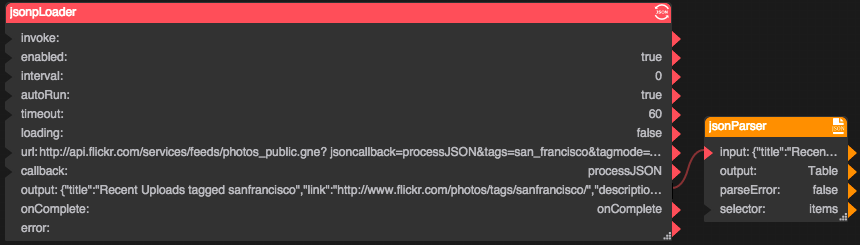 | This example uses the URL http://api.flickr.com/services/feeds/photos_public.gne?jsoncallback=processJSON&tags=san_francisco&tagmode=any&format=json. The callback defined at the URL is called processJSON. The output is linked to a JSON Parser block to create a table. |