Load History
| Block Group: | Data Services |
| Icon: | no icon |
The Load History block retrieves information about the value history of a data node.
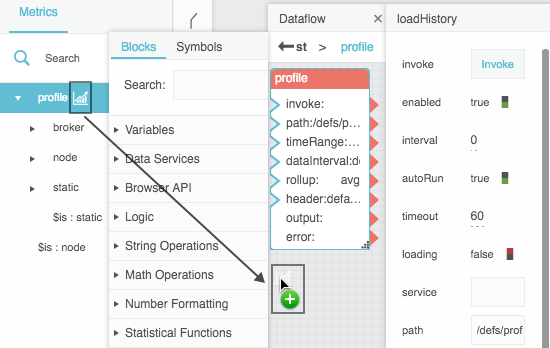
To automatically create a Load History block for a node at a particular path, you can drag that node's  History icon from the Metrics panel into the dataflow window.
For information on using dataflow blocks, see Dataflow.
Input/Output Properties
The following properties of the Load History block can take input and give output.
- invoke (trigger)
- enabled (boolean)
- interval (number)
- autoRun (boolean)
- timeout (number)
- path (string)
- timeRange (date range)
- dataInterval (enum or string)
- rollup (enum or string)
- header (enum or string)
- delta (enum or string)
- unifyTimezone (enum or string)
invoke causes the history to be loaded. The invoke property only works if enabled is set to TRUE.
enabled specifies whether the Load History block is enabled.
- TRUE—The history loads as specified by invoke, autoRun, and interval.
- FALSE—The history does not load.
interval specifies how often the history is loaded, in seconds. A value of 0 means that the history is reloaded on autoRun or invoke only.
autoRun specifies whether the history is loaded automatically.
- TRUE—The history is loaded every time any property is changed. A Load History block added from the dataflow palette has autoRun set to TRUE. The first time that the path property is populated counts as a change.
- FALSE—The history is loaded only when the invoke property is triggered, or at the specified interval.
timeout specifies how long, in seconds, the loader attempts to load the history before the request is canceled. The default is 60.
path specifies the history for which to return information.
timeRange specifies the date and time range to return the history for. You can click the button and use the date range picker to specify a range. The default is today.
dataInterval specifies the date or time interval between each consecutive pair of data points. Options are Default (default), None, One year, Three months, One month, One week, One day, Twelve hours, Six hours, Four hours, Three hours, Two hours, One hour, Thirty minutes, Fifteen minutes, Ten minutes, Five minutes, One minute, Thirty seconds, Fifteen seconds, Ten seconds, Five seconds and One second.
rollup specifies the type of rollup used. The value of rollup can be one of the following:
- Avg (default)—The average of all number values for the interval
- Min—The smallest number value for the interval
- Max—The largest number value from the interval
- Sum—The sum of all number values for the interval
- First—The first value for the interval
- Last—The last value for the interval
- And—The logical AND of all values for the interval
- Or—The logical OR of all values for the interval
- Count—The number of non-null values that exist for the interval
- Auto—No rollup is specified; the server's default is used
header specifies which string is used to name the "value" column in the output table.
- Default (default)—The default string "value"
- Name—The name of the data node
- Parent—The name of the data node's parent
- Parent name—The names of both this node and its parent
delta specifies what is in the "value" column of the output table.
- None (default)—The value collected at the given time
- With previous—The difference between the values in this row and the previous one
- With next—The difference between the values in this row and the next one
With With previous, the first row is removed; with With next, the last row is removed.
unifyTimezone specifies the time zone of the timestamps in the output table.
- auto (default) or local—Timestamps are converted to the browser's local time zone.
- remote—Timestamps are kept in the time zone returned by the server.
- You can also enter a time zone offset such as
+08:00or-05:00.
Output Properties
The following properties of the Load History block can give output but cannot take input.
- loading (boolean)
- output (table)
- error (string)
- onError (event)
loading returns whether the history is currently loading.
output returns a table of the given history's values. Columns are:
- timestamp—The time when the data was collected
- value—The data node's value, or the delta if specified
- status—The status of the data node at the time of collection
error returns the error string, if any. If the request times out, error is timeout.
onError fires if an error occurs or the request times out.
Example
The following image demonstrates how to create a Load History block by dragging a History icon to the dataflow window.