And
| Block Group: | Logic |
| Icon: |  |
Returns one value if all its input properties are TRUE and another value if one or more input properties is FALSE.
An And block is simply an If block where the op property is set to "and".
One common use for the "and" function is to expand the capability of a block that performs a logical test. For example, the If block performs a logical test to evaluate whether a condition is true or false. By using the "and" function as the op property of the If block, you can test many different conditions instead of just one.
For information on using dataflow blocks, see Dataflow.
Input/Output Properties
These properties can take input and give output.
- op (enum)
- input n (number, string or boolean)
- then (number, string or boolean)
- else (number, string or boolean)
op specifies the comparison, logical, or text operator to apply to the input values. The operator is used in conjunction with inputs to form an expression that can be evaluated to TRUE or FALSE. By default, the op value of an And block is "and". The block will not act as described on this page if you change this property. See If Block for more information.
input n specifies one of the input values. All input n values must evaluate to TRUE for the And block to return the then value. For example, "input 0 AND input 1" is a comparison expression. If the values input 0 and input 1 are TRUE, the expression evaluates to TRUE and the And block outputs the then value. Otherwise, if one of the inputs is FALSE, the And block outputs the else value. If input n is a number, 0 (or NaN) evaluates to FALSE and any other number evaluates to TRUE. The strings "true", "True", "TRUE" and "Active" evaluate to TRUE; empty strings, "false", "False", "FALSE" and "Inactive" evaluate to FALSE. A null input evaluates to FALSE. Add more input n properties by clicking the plus sign.
then specifies the value to return if all of the input properties evaluate to TRUE.
else specifies the value to return if one or more of the input properties evaluate to FALSE.
Output Properties
These properties can give output. They cannot take input.
- output (number, string or boolean)
output returns either the then value or the else value. It returns the then value if all of the input n values evaluate to TRUE, and the else value otherwise.
Remarks
- You can add more input n properties by clicking the plus sign, and delete them by clicking the minus sign. You can have up to 1024 input properties. The block needs at least two inputs to update its output. When you add a new input property, it is true by default.
- The input properties should evaluate to logical values, such as TRUE or FALSE.
Model
This is a basic use of the block.
| Dataflow Model | Description |
|---|---|
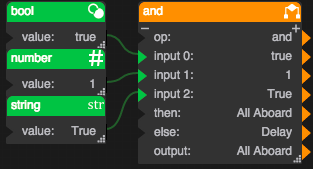 | If the values in input 0, input 1, and input 2 are true, then the output is "All Aboard". Otherwise, the output is "Delay". |