Stop Watch
| Block Group: | Logic |
| Icon: |  |
The Stop Watch block counts up when enabled. An event is fired when the block loops or stops.
For information on using dataflow blocks, see Dataflow.
Input/Output Properties
The following properties of the Stop Watch block can take input and give output.
- enabled (boolean)
- interval (number)
- step (number)
- modulo (number)
- loop (boolean)
- reset (trigger)
- resetValue (number)
- onLoop (event)
modulo, loop, reset, resetValue and onLoop are not shown on the block; edit or bind them in the Properties panel.
enabled sets or returns whether the Stop Watch block is currently counting up.
interval specifies the duration, in seconds, between updates to the output property. For example, if interval is 0.5, the output property counts up every 0.5 seconds. If interval is 0, the stopwatch does not count. The Stop Watch block from the palette has an interval of 0.5.
step specifies the number that is added to the output with each update. For example, if step is 1, then each time the stopwatch counts up, its output increases by 1. The Stop Watch block from the palette has a step of 1.
modulo Specifies the value that signals the stopwatch to loop or stop.If loop is TRUE, then the stopwatch will loop when it reaches the final step before modulo, and output is always less than modulo. If loop is FALSE, then the stopwatch stops at the first step where output is greater than or equal to modulo. If modulo is 0 (the default), the stopwatch never loops or stops.
loop determines whether the Stop Watch block will start again when it reaches modulo. The default is TRUE.
- TRUE—The stopwatch starts again after its output reaches the final step before reaching modulo. If the difference between the final step and modulo equals the step value, the stopwatch restarts at 0. If the difference is less than the step value, the stopwatch restarts with a value of that difference.
- FALSE—The stopwatch stops counting at the first step where output is greater than or equal to modulo.
reset causes the stopwatch to restart at the resetValue.
resetValue specifies the value that the stopwatch is set to when reset is triggered. The default is 0.
onLoop fires when the stopwatch either loops or stops.
Output Property
The following property of the Stop Watch block can give output but cannot take input.
- output (number)
output returns the current stopwatch value.
Example
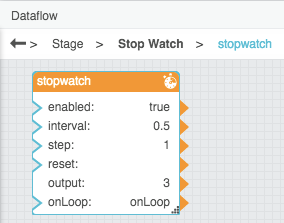
The following image demonstrates a Stop Watch block. In this example, the block counts up by 1 every 0.5 seconds.
Use Case
This thread in the DGLogik Community Forum shows a use cases for the block: