JSON Parser
| Block Group: | Table Operations |
| Icon: |  |
The JSON Parser block converts a JSON string into a table. The output table can contain other tables within itself. For more information about nested tables, see How to View the Contents of Nested Tables.
This is a commonly used block, because many data-driven features in DGLux5, such as charts and repeaters, require tabular data.
The JSON Parser block is sometimes used to parse a string that has been loaded by a String Loader block.
For information on using dataflow blocks, see Dataflow.
For answers to some common questions about working with tables, see Tables.
Input/Output Properties
The following properties of the JSON Parser block can take input and give output.
- input (string)
- selector (string)
- drillDownDepth (integer)
- drillDownFilter (string)
- flatFilter (string)
- rawJsonFilter (string)
drillDownDepth, drillDownFilter, flatFilter and rawJsonFilter are hidden in the block by default. You can set them in the Properties panel.
input receives the JSON string. Sometimes it is the output from a String Loader block. input can also receive an already parsed object or array.
selector specifies the location of the data in the JSON string to parse into a table, using dot notation and brackets (for example data.items or data[0].items). If selector is empty and the JSON is an object, the block uses the first array it finds in the object and fills in selector automatically.
Keys of nested objects are flattened into columns whose names are joined with / (for example address/city).
drillDownDepth (default 1) specifies how far to drill down into the JSON when extracting data. Data below the drillDownDepth is not included in the output. The drillDownDepth property works only when a drillDownFilter or flatFilter is specified.
drillDownFilter specifies which arrays to return as nested tables. Enter a comma-separated list of key names, or * to return all arrays as nested tables to the specified drillDownDepth.
flatFilter specifies which arrays to flatten into columns of the same row (named key/0, key/1, and so on). Enter a comma-separated list of key names, or * to flatten all arrays to the specified drillDownDepth.
rawJsonFilter specifies which values to keep as raw JSON objects or arrays in a single cell, instead of flattening them. Enter a comma-separated list of key names, or * to keep all values raw.
Output Properties
The following properties of the JSON Parser block can give output but cannot take input.
- output (table)
- parseError (boolean)
output returns a table parsed from the JSON data.
parseError indicates whether the block encountered an error. An error might be caused by improperly formatted input.
Example
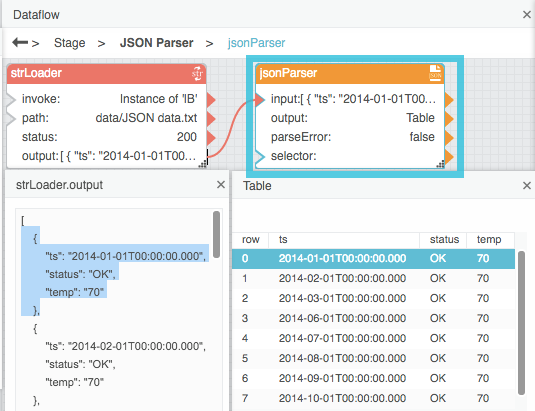
The following image shows, clockwise from top left:
- A String Loader block
- A JSON Parser block
- The output table of the JSON Parser block
- The JSON file