Import a Project
DGLux5 can import projects that were created with DGLux5. Projects are imported as .zip files.
Method 1: Main Menu
To import a project using the Project menu:
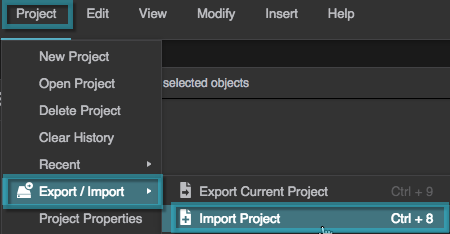
In the Main Menu, select Project > Export/Import > Import Project.
Click Chose File.

Browse to the
.zipfile on your computer, and click OK.Do not unzip the file.
Method 2: Welcome Dialog
To import a project using the Welcome dialog:
- Select Project > Open Project to open the Welcome dialog.
Select Open/Import, and click the Import button at the bottom of the project list.

Browse to the
.zipfile on your computer, and click OK.Do not unzip the file.