Export HTML
| Block Group: | Browser API |
| Icon: |  |
Converts the current component or .dg5 file to HTML, PDF, PNG, or JPG, and either causes the converted file to be downloaded or outputs it as an HTML string or a binary object. If the parent of this dataflow block is the Stage, then the entire page is exported.
For information on using dataflow blocks, see Dataflow.
Input/Output Properties
These properties can take input and give output.
- invoke (trigger)
- enabled (boolean)
- format (enum)
- filename (string)
- orientation (enum)
- pdfSize (enum)
- pdfOverflow (boolean)
- scale (number)
- inlineStyles (boolean)
invoke causes the file to be exported. Only works when enabled is set to TRUE.
enabled specifies whether exporting is enabled. The default is TRUE.
- TRUE: The file is exported as specified by invoke.
- FALSE: The file is not exported.
format specifies the file format to export. The default is png.
- png: PNG image.
- jpg: JPG image.
- pdf: PDF document.
- html: HTML file.
filename specifies a name for the exported file. If the name has no extension, the format is appended as the extension (for example, download becomes download.png). If blank, the file is not downloaded and is returned in output instead. When you add this block from the palette, filename is download.
orientation specifies the page orientation for PDF export: landscape (default) or portrait.
pdfSize specifies the page size for PDF export: a3, a4, a5 (default), letter, legal, or autosize. With autosize, the page is sized to fit the exported content.
pdfOverflow specifies, for PDF export, whether content that does not fit on one page continues on additional pages. The default is FALSE.
scale specifies the resolution factor for PDF export. To sharpen the rendering of content that might be fuzzy, increase this setting. The default is 1.
inlineStyles specifies, for HTML export, whether the page's stylesheets are embedded in the exported file.
- TRUE: The contents of linked stylesheets are copied into the HTML file, so the file does not need to load them from the server.
- FALSE: The HTML file links to the stylesheets on the server.
Output Properties
These properties can give output. They cannot take input.
- loading (boolean)
- output (string or binary)
loading returns TRUE while the file is being exported. It is hidden on the block by default.
output returns the contents of the exported file, if no filename is defined. For html format, this is an HTML string. For other formats, this is a binary object.
Remarks
- In an exported HTML file, assets stored in the DGLux5 project, such as images, can only be displayed if the user can view the project.
Model
These are basic uses of the block.
| Dataflow Model | Description |
|---|---|
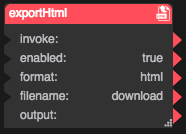 | Because a filename is defined, the HTML file is downloaded. |
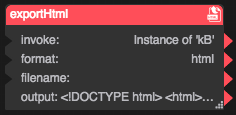 | Because no filename is defined, the HTML string is returned as output. |