Download File
| Block Group: | Data Services |
| Icon: | no icon |
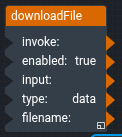
The Download File block downloads a file to the user's computer when it is invoked. It is the same block that is created by a Download File action. The file can be a file at a path or URL, or data such as a string, a table or binary content.
For information on using dataflow blocks, see Dataflow.
Input/Output Properties
The following properties of the Download File block can take input and give output.
- invoke (trigger)
- enabled (boolean)
- input (any)
- type (enum)
- filename (string)
invoke causes the file to be downloaded. The invoke property works only if enabled is set to TRUE.
enabled specifies whether the Download File block is enabled. The default is TRUE.
- TRUE—The file is downloaded when this block is invoked.
- FALSE—Nothing happens when this block is invoked.
input specifies what to download, according to type.
type specifies how input is used.
- data (default)—input is the content of the file. A table is downloaded as a CSV file, binary content (for example, the output of a Zip Download block) is downloaded as is, and any other value is downloaded as text. A
data:URL with base64 content is decoded first. - path—input is a file path relative to the root of this project, or a URL. You can drag a file from the Project panel to this field.
filename (optional) specifies the name and extension that the file should have when it is downloaded. If type is data and filename is blank, the file is named download.