Open Wizard
| Block Group: | Logic |
| Icon: | no icon |
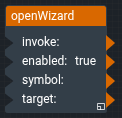
The Open Wizard block opens a wizard in the editor. A wizard is a symbol that is opened as a dialog to edit a target object, the same way as a wizard that is opened with the wizard button of a component that has a wizardSymbol.
The block only works in Design mode. It does nothing in Preview mode or in a running project. It can be used from inside another wizard, to open a second wizard.
In the block palette, this block is in the Other group.
For information on using dataflow blocks, see Dataflow.
Input/Output Properties
The following properties of the Open Wizard block can take input and give output.
- invoke (trigger)
- enabled (boolean)
- symbol (symbol)
- target
invoke opens the wizard. The wizard opens after a short delay (100 ms).
enabled specifies whether the block responds to invoke. The default is TRUE.
symbol specifies the name of the symbol to open as the wizard. If symbol is empty, nothing happens.
target specifies the object that the wizard edits.