Script
| Block Group: | Logic |
| Icon: |  |
Holds a custom script.
For information on using dataflow blocks, see Dataflow.
Input/Output Properties
These properties can take input and give output.
- invoke (trigger)
- autoRun (boolean)
- qosMode (boolean)
- script (string or multi-line text)
- custom properties (such as a–z)
invoke causes the script to run.
autoRun specifies whether the script runs automatically.
- TRUE: The script runs every time the script is changed, and every time any property is changed. This includes the first time that the script is initialized.
- FALSE: The script runs only when the invoke property is triggered.
This property is not shown on the block; edit it in the Properties panel.
qosMode specifies when the script runs after invoke is triggered.
- FALSE (default): The script waits until other pending blocks have been updated. If it is triggered several times before it runs, it runs only once.
- TRUE: The script runs immediately, every time invoke is triggered.
This property is not shown on the block.
script specifies the instance of DGScript held by this block. See Scripting and Syntax for more information about creating a script.
custom properties set or return the values of properties that you can use in your script as needed. You add them to the block and choose their names (for example, a–z).
Output Properties
These properties can give output. They cannot take input.
- output
- print (string)
output returns the output of your script. It can be any type. If the script throws an error, output is null.
print returns a string that is used for errors, other notifications, and debugging. If the script is empty, print returns "Program is empty".
Model
These are basic uses of the block.
| Dataflow Model | Description |
|---|---|
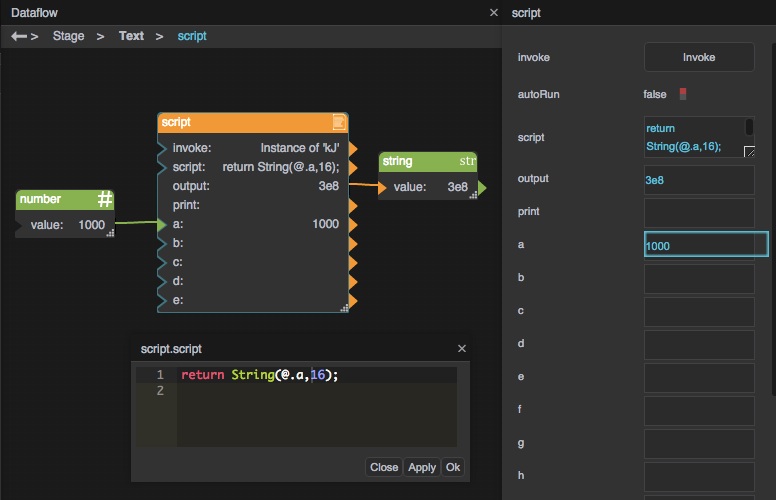 | This script uses a function from the DGLux5 script reference to convert a base 10 number to base 16. |
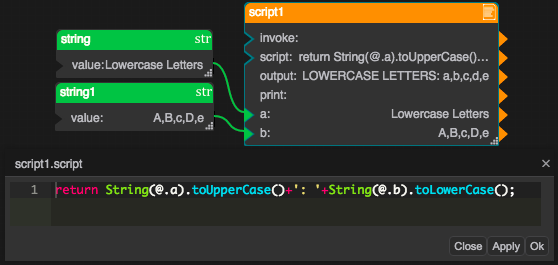 | This script converts the first input string to all uppercase letters and the second input string to all lowercase letters. It concatenates them with a middle string that includes a space and some punctuation. |