Replace
| Block Group: | String Operations |
| Icon: |  |
The Replace block replaces a substring of a text value.
You can replace multiple strings within the text with a single Replace block.
For information on using dataflow blocks, see Dataflow.
Input/Output Properties
The following properties of the Replace block can take input and give output.
- input (string)
- regexp (boolean)
- find n (string or number)
- replace n (string or number)
input specifies the text string in which to replace characters.
regexp specifies whether to find strings using a regular expression. For more information on regular expressions visit http://www.regexr.com/.
find n specifies the text to find.
replace n specifies the text to replace find n with.
Click the plus sign in the block to add another find n and replace n pair. Pairs with an empty find n are ignored.
When regexp is FALSE, the pairs are applied in order, top to bottom, so a later pair can change text produced by an earlier pair. When regexp is TRUE and there are multiple pairs, all expressions are matched against the original input and replaced in a single pass.
Output Property
The following property of the Replace block can give output but cannot take input.
- output (string)
output returns the string with all replacements.
Examples
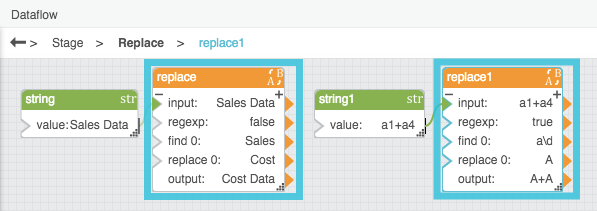
The following image shows two examples of the Replace block. In the leftmost Replace block, the word "Sales" is replaced with "Cost." In the rightmost Replace block, matches for the regular expression "a\d" are replaced with "A."