Remove Rows
| Block Group: | Table Operations |
| Icon: | no icon |
The Remove Rows block deletes rows from the input table. When the block’s trigger is invoked, rows that meet the specified criteria are deleted from the input table. The input table must be a table that can be written to, such as the value stored by a Table block.
Caution
The Remove Rows block writes to the input table.
Input/Output Properties
The following properties of the Remove Rows block can take input and give output.
- invoke (trigger)
- enabled (boolean)
- table (table)
- condition (script)
invoke causes the rows to be removed.
enabled determines whether the block is enabled. The default is TRUE.
- TRUE—The rows are removed when the trigger is invoked.
- FALSE—The rows are not removed.
table receives the input table from which some rows will be removed.
condition specifies the expression that determines which rows are removed. For example, to remove only the first row from the table, enter row==0. See Scripting and Syntax.
Output Properties
The following properties of the Remove Rows block can give output but cannot take input.
- print (string)
- onComplete (event)
print (hidden in the block by default) returns a string that is used for errors, other notifications, and debugging.
onComplete (hidden in the block by default) fires after the rows have been removed.
Example
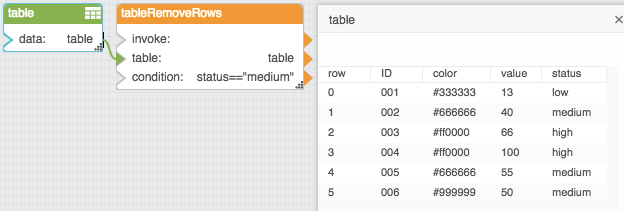
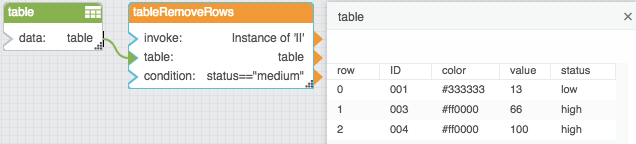
The following images demonstrate an example of the Remove Rows block. The first image shows the block and table before invocation, and the second image shows the block and table after invocation. In this example, the rows where the status column holds “medium” are deleted when the block is invoked.