Select Rows
| Block Group: | Table Operations |
| Icon: |  |
The Select Rows block returns a table that contains only the specified rows from the input table.
For information on using dataflow blocks, see Dataflow.
For answers to some common questions about working with tables, see Tables.
Input/Output Properties
The following properties of the Select Rows block can take input and give output.
- input (table)
- indexes (string)
input receives the table from which you want to select rows.
indexes specifies the rows in the input table to select, as comma-separated zero-based row positions (for example 1,3,5). A single number is also accepted. Indexes that are out of range are ignored. Rows are returned in the order listed.
When you add this block from the palette, input and indexes are bound to the parent component's data and selectedIndex properties by default.
Output Property
The following property of the Select Rows block can give output but cannot take input.
- output (table)
output returns a new table. It contains only the rows at the specified indexes.
Example
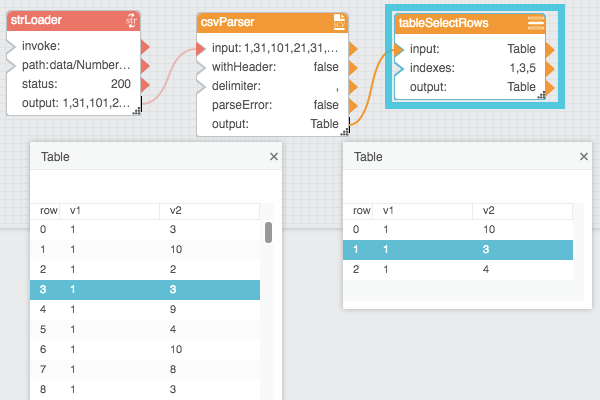
The following image shows an example of the Select Rows block. In this example, the output table contains only rows 1, 3, and 5 from the input table.