Table
| Block Group: | Variables |
| Icon: |  |
The Table block holds values as a set of records.
For information on using dataflow blocks, see Dataflow.
See also: Table Operations dataflow blocks, Working with Tables.
Input/Output Properties
These properties of the Table block can take input and give output.
- data (table)
- save (trigger)
The save property is not displayed on the block itself.
data sets and returns the table held by this Table block.
save removes any binding to the data property. When a binding is deleted by invoking save, data currently in the table does not change, even if that data was determined by a binding. See How do I unbind and save the data that is currently held by my table?
How to Manually Edit Values in a Table Block
You can use the following methods to manually edit values in a Table block:
- To edit the contents of a cell, double-click the cell.
- To add a row, click Add Row.
- To add a column, click Add Column.
- To delete one or more consecutive rows or columns, select the rows or columns, right-click them, and choose Delete.
- To add one or more rows or columns, select the same number of rows or columns as the number that you want to add. Then, right-click the selected rows or columns, and choose one of the following:
- Add Row(s) Above
- Add Row(s) Below
- Add Column(s) to the Left
- Add Column(s) to the Right.
Example
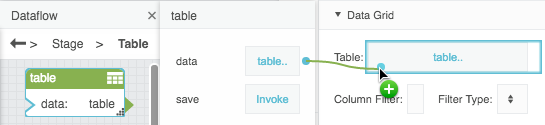
The following image demonstrates a binding from a Table block to the Table property of a data grid.