Web Document
| Block Group: | Browser API |
| Icon: |  |
Sends and retrieves a variety of information to and from the browser, including device information, header title, and search and hash strings.
This block has several uses:
- Sends some information to the browser, including the title of the project for the tab or window header.
- Sets and returns a hash string allowing for deep linking.
- Retrieves information about the user’s browser and system, as reported by the browser.
This block always refers to the whole project, regardless of whether it is in the Project Dataflow or the dataflow for a different object.
Input/Output Properties
These properties can take input and give output.
- title (string)
- hash (string)
- zoom (number)
- initialScale (number)
- lockScale (boolean)
- preventBackspace (boolean)
title specifies the title for this web document. Typically, the user sees this title in the title bar of the browser window or tab. Only works in the Viewer, and only when the value is not blank.
hash sets or returns the string to appear after the hash (#) symbol in the URL. This allows you to create deep links and custom experiences based on data, properties, or user interaction. The hash value is saved across sessions and browser windows. The browser’s Back and Forward commands iterate through hash addresses.
zoom sets or returns the current zoom level of the stage. For example, a value of 2 means a zoom level of 200%. The default is 1.
initialScale only applies to mobile devices. It determines the zoom level at which the project is opened. By default it is not set (auto), and the browser's default scale is used.
- A value of 1: The application appears at normal scale.
- Values greater than 1: The application appears smaller on mobile devices.
- Values less than 1: The application appears larger on mobile devices.
lockScale only applies to mobile devices. It determines whether zooming is allowed.
- TRUE: Zooming is not allowed on mobile.
- FALSE: The user can pinch to zoom on mobile.
preventBackspace specifies whether pressing the Backspace key is prevented from navigating back to the previous page. Backspace still works normally in text inputs, text areas, and editable content.
- TRUE: Backspace does not navigate back.
- FALSE: The browser's default Backspace behavior applies.
Output Properties
These properties can give output. They cannot take input.
Commonly Used Properties
These might be the most commonly used output properties:
- width (number)
- height (number)
- screenWidth (number)
- screenHeight (number)
- url (string)
- protocol (string)
- host (string)
- platform (string)
- pathname (string)
- inIFrame (boolean)
- search (string)
- language (string)
- isMobile (boolean)
- hasTouch (boolean)
- onBeforePrint (event)
- onAfterPrint (event)
width retrieves the width of the usable portion of the user’s browser window in pixels.
height retrieves the height of the usable portion of the user’s browser window in pixels.
screenWidth retrieves the width of the user’s entire screen in pixels.
screenHeight retrieves the height of the user’s entire screen in pixels.
url returns the full URL of this page.
protocol returns whether the project’s URL begins with HTTP or HTTPS.
host returns the path to the host of this project.
platform retrieves the platform the browser is running on.
pathname returns the pathname of this project. This is the portion of the URL after the protocol and host, and before any hash or search strings.
inIFrame returns whether this instance of the project is within an IFrame.
search returns the string that appears after the question mark (?) symbol in the URL. You can bind the search property to a Script block and use string functions, such as str.decodeUriComponent(), to parse it into a usable string.
language retrieves the language code of the browser.
isMobile returns whether the user is using a mobile device.
hasTouch returns whether the user’s device supports touch events.
onBeforePrint fires before the browser window contents are sent to the printer dialog. You can use this for changing configuration to prepare for printing.
onAfterPrint fires after the browser window contents are sent to the printer dialog. You can use this for reverting changes made using onBeforePrint.
Less Commonly Used Properties
These might be less commonly used output properties:
- pixelDepth (number)
- pixelRatio (number)
- userAgent (string)
- appName (string)
- appCodeName (string)
- appVersion (string)
- product (string)
- productSub (string)
- vendor (string)
- vendorSub (string)
- iosVersion (number)
- currentFile (string)
- dragGroup (string)
- stringLoaderTopics (number)
pixelDepth retrieves the color depth or bit depth of the user’s screen, as reported by the browser. This is the number of bits used to determine the color of a pixel.
pixelRatio retrieves the ratio of physical screen pixels to CSS pixels (window.devicePixelRatio), as reported by the browser.
userAgent retrieves the user–agent string, which identifies the browser and certain system details. It might not be accurate.
appName retrieves the name of the user’s browser. However, it is not a reliable source of information and often returns "Netscape" for various browsers.
appCodeName retrieves the internal code name of the browser. However, it is not a reliable source of information and returns "Mozilla" in most cases.
appVersion retrieves the browser version. It might not be accurate.
product always returns "Gecko," on any browser. It is not a reliable source of information.
productSub retrieves the build number of the browser.
vendor retrieves the vendor name of the browser.
vendorSub retrieves the version number substring of the vendor information. However, it is not a reliable source of information.
iosVersion returns the major iOS version if the user is on an iOS device, or -1 otherwise.
currentFile returns the path of the .dg5 file that is currently open.
dragGroup returns the drag group of the item currently being dragged in DGLux5, and is cleared when the drag ends.
stringLoaderTopics is used internally in the Viewer to report String Loader topic counts.
Model
This is a basic use of the block.
| Dataflow Model | Description |
|---|---|
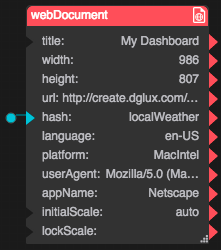 | The Web Document Block is sending a page title of "My Dashboard" to the browser. It is also saving a hash value of "localWeather." This hash value can be set by user action and can set other properties in DGLux5. It is saved across sessions and browser windows. |