Keyboard Event
| Block Group: | Logic |
| Icon: |  |
Listens for a keyboard event and returns a code for the key that caused the event. Fires a trigger when the event is detected.
For information on using dataflow blocks, see Dataflow.
Input/Output Properties
These properties can take input and give output.
- input (event)
- active (boolean)
- fastResponse (boolean)
- filter (string)
- output (event)
input specifies the event that triggers this block. Make sure that you have selected the correct parent element for the event, and then find the event in the Advanced properties and bind it to this property. Valid events are:
- onKeyDown – The user depresses a key while the element is in focus.
- onKeyUp – The user releases the depressed key.
active sets or returns whether this block is currently listening for the specified event. The default is TRUE.
fastResponse determines whether the fastResponse feature is enabled. Use this feature when you troubleshoot performance speed issues relating to this block.
- TRUE: When the event is received, pending dataflow updates are run immediately, so the response is as fast as possible. This could cause other actions to be delayed to the next frame.
- FALSE: This is the default behavior.
This property is not shown on the block.
filter specifies the keystroke to listen for. This can be a character, or one of the following strings:
- “esc” – Escape key
- “enter” – Enter or Return key
- “up” – Up arrow
- “down” – Down arrow
- “left” – Left arrow
- “right” – Right arrow
- “space” – Space bar
- “backspace” – Backspace key
- Combination strings such as “alt+enter” or “ctrl+shift+s” – Join the modifier keys ctrl, alt, shift and meta with
+. The modifier keys must match exactly. An upper-case letter, such as “S”, means “shift+s”.
Do not include quotation marks.
output fires when the event matches filter. When it fires, the browser's default response to the key is disabled and the event does not propagate further. If the event does not match, or filter is empty, output is set to null.
Output Properties
These properties can give output. They cannot take input.
- event (string)
- keyCode (number)
- ctrl (boolean)
- alt (boolean)
- shift (boolean)
- meta (boolean)
event returns the name of the event type that triggers this block, such as onKeyDown.
keyCode returns the key code of the last key to undergo key down or key up, whichever was specified. Refer to instances of JavaScript keyCode.
ctrl for an onKeyUp event, returns whether Ctrl is still being held, if it was held with the last key typed. For an onKeyDown event, returns whether Ctrl was the last key down.
alt for an onKeyUp event, returns whether Alt is still being held, if it was held with the last key typed. For an onKeyDown event, returns whether Alt was the last key down.
shift for an onKeyUp event, returns whether Shift is still being held, if it was held with the last key typed. For an onKeyDown event, returns whether Shift was the last key down.
meta for an onKeyUp event, returns whether Meta is still being held, if it was held with the last key typed. For an onKeyDown event, returns whether Meta was the last key down.
Model
This is a basic use of the block.
| Dataflow Model | Description |
|---|---|
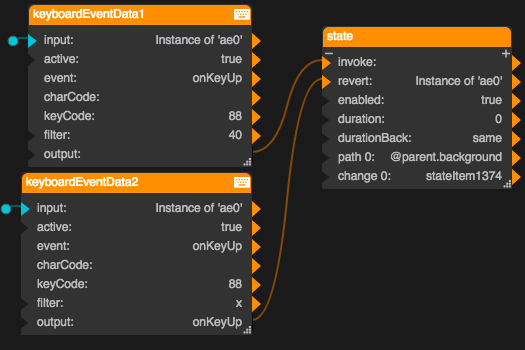 | When the user types z the background color changes, and when the user types x the color is reverted. |
Use Cases
To force a text input component to revert to its placeholder text when the user types the Esc key:
- Insert a text input component.
- Set the text input component’s focusable Advanced property to TRUE.
- Bind the text input component’s onKeyUp Advanced property to the input property of the Keyboard Event block.
- In the filter field of the Keyboard Event block, type
esc. - Bind the output property of the Keyboard Event block to the input property of the Script block.
- In the script field of the Script block, type:
@parent.unfocus = Math.random();
@parent.value = @parent.placeholder.value;
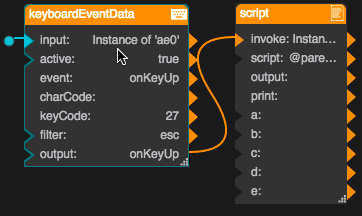
Now, when the user starts entering text in the component and presses the Esc key, the text reverts to the placeholder.
More Resources
This thread in the DGLogik Community Forum shows a use case for the block: