Resize Event
| Block Group: | Logic |
| Icon: |  |
Listens for a resize event, and fires a trigger when such an event is detected.
The Resize Event block is a fairly demanding feature that might influence performance. In order to use the Resize Event block, you must enable resizeEventEnabled in the element’s Advanced properties.
For information on using dataflow blocks, see Dataflow.
Input/Output Properties
These properties can take input and give output.
- input (event)
- active (boolean)
- fastResponse (boolean)
input specifies the event type to listen for. By default, it is the onResize event for this element.
active specifies whether the listener is currently listening. The default is TRUE.
fastResponse determines whether the fastResponse feature is enabled. Use this feature when you troubleshoot performance speed issues relating to this block.
- TRUE: When the event is received, pending dataflow updates are run immediately, so the response is as fast as possible. This could cause other actions to be delayed to the next frame.
- FALSE: This is the default behavior.
This property is not shown on the block.
Output Properties
These properties can give output. They cannot take input.
- event (string)
- offsetWidth (number)
- offsetHeight (number)
- clientWidth (number)
- clientHeight (number)
event returns the name of the event type when the input event occurs.
offsetWidth returns the width of this entire element, in pixels, when the element is resized.
offsetHeight returns the height of this entire element, in pixels, when the element is resized.
clientWidth and clientHeight are not shown on the block.
clientWidth returns the width of the contents of this element, in pixels, when the element is resized. It includes padding, but it does not include the border or vertical scroll bar.
**clientHeight ** returns the height of the contents of this element, in pixels, when the element is resized. It includes padding, but it does not include the border or horizontal scroll bar.
Model
This is a basic use of the block.
| Dataflow Model | Description |
|---|---|
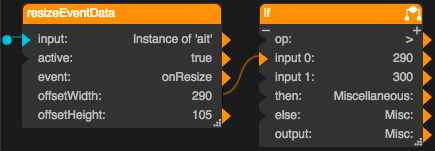 | The label text is “Miscellaneous:” if the group is wider than 300 pixels. The text is shortened to “Misc:” if the group is 300 pixels or narrower. |