ESRI Map Properties
These properties affect the ESRI Map component and the layers that you can insert into it. For a guide to using the component, see ESRI Map.
The map and its layers are also affected by Common Properties. Properties that are not shown in the Property Inspector can be edited in the Advanced properties.
ESRI Map
Map section
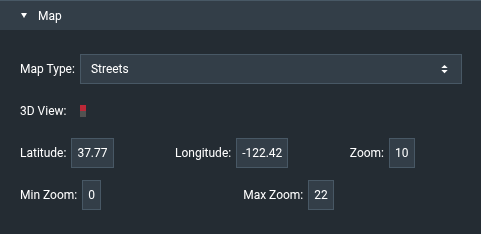
| Property | Description |
|---|---|
| Map Type | The ArcGIS basemap: Streets (default), Satellite, Hybrid, Topo, Gray, Dark Gray, Oceans, National Geographic, Terrain, OSM, Dark Gray Vector, Gray Vector, Streets Vector, Topo Vector, Streets Night Vector, Streets Relief Vector, or Streets Navigation Vector. Ignored when mapStyleUrl or mapStyle is set. |
| 3D View | When selected, the map is shown as a 3D scene instead of a 2D map. |
| Latitude, Longitude | Set or return the center of the map. |
| Zoom | Sets or returns the zoom level. The default is 8. |
| Min Zoom, Max Zoom | The lowest and highest zoom levels that the user can reach. Defaults: 0 and 22. |
Advanced properties
| Property | Description |
|---|---|
| boundsWest, boundsNorth, boundsEast, boundsSouth | Return the current extent of the map. Set them to fit the map to a new extent. |
| boundsAnimationSpeed | When set to a value greater than 0, changes of the center or bounds are animated. |
| fittingBounds | Output only. TRUE while the map is animating to new bounds. |
| mapStyleUrl | URL of a custom vector tile style created with the ArcGIS Vector Tile Style Editor. |
| mapStyle | Style JSON of a custom vector tile style. |
| zoomToolPosition, navigationToolPosition, compassToolPosition | Corner where each map tool appears: Top-Left (default), Top-Right, Bottom-Left, or Bottom-Right. |
| toolPaddingLeft, toolPaddingRight, toolPaddingTop, toolPaddingBottom | Distance in pixels between the map tools and the map edges. The default is 15. |
| onMapInit | Event fired when the map has been initialized. |
ESRI Map Group
An ESRI Map Group holds components, or a symbol repeater, that are placed at map coordinates. It works like the Map Group of the Google Map.
Repeater section
| Property | Description |
|---|---|
| Symbol | The symbol that is repeated once for each row of Data. |
| Data | The table that drives the repeater. |
| Latitude Field, Longitude Field | The table columns that contain the coordinates of each symbol instance. |
Advanced properties
| Property | Description |
|---|---|
| selectedIndex, multiSelect, selectChildOnClick | Selection of repeater items. See Selection. |
| numChildren | Output only. The number of children of the group. |
| animateIdValues | When TRUE, items whose idField value stays the same move smoothly to their new position when the data changes. |
| idField | The table column that uniquely identifies each row. |
| idValueAnimationDuration | Duration of the movement in milliseconds. The default is 300. |
| idValueAnimationEasing | Easing function: Linear, Ease In Out (default), Ease In, Ease Out, Cubic In Out, Cubic In, Cubic Out, Elastic In Out, Elastic In, Elastic Out, or Bounce. |
ESRI Map GeoJSON Layer
Draws GeoJSON features on the map.
GeoJSON section
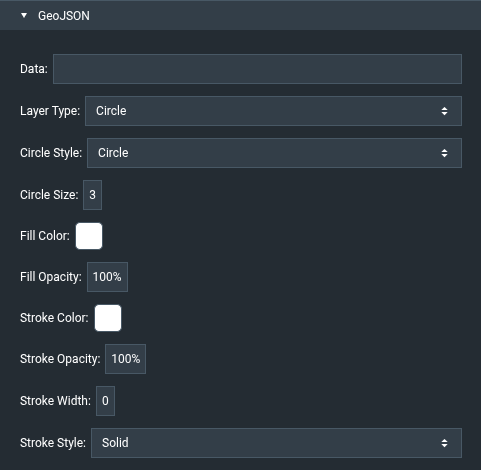
| Property | Description |
|---|---|
| Data | GeoJSON string that defines the features. |
| Layer Type | Circle (default) draws point features. Polygon draws area features. |
| Circle Style | Marker shape for the Circle type: Circle (default), Cross, Diamond, Square, or X. |
| Circle Size | Marker size for the Circle type. The default is 3. |
| Fill Color, Fill Opacity | Fill of the markers or polygons. Defaults: white and 100%. |
| Stroke Color, Stroke Opacity, Stroke Width | Outline of the markers or polygons. Defaults: white, 100%, and 0. |
| Stroke Style | Solid (default), Dash, Dash-Dot, Dot, None, Long-Dash, Long-Dash-Dot, Long-Dash-Dot-Dot, Short-Dash, Short-Dash-Dot, Short-Dash-Dot-Dot, or Short-Dot. |
ESRI Map Heatmap Layer
Uses color coding to show the density and intensity of points in a table.
Heat Map section
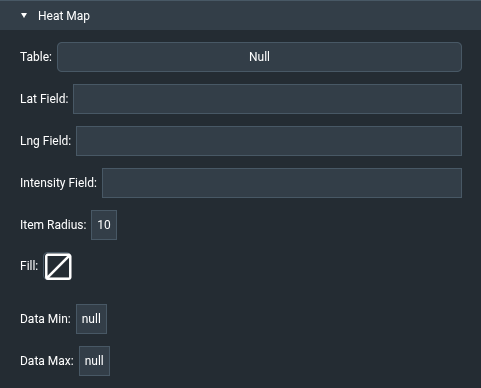
| Property | Description |
|---|---|
| Table | The table that contains the points. |
| Lat Field, Lng Field | The table columns that contain the latitude and longitude of each point. |
| Intensity Field | The table column that contains the value of each point (dataField). |
| Item Radius | Radius of each point in pixels. The default is 10. |
| Fill | The color gradient of the heat map, from low to high intensity. |
| Data Min, Data Max | Optional fixed intensity range. Leave empty to use the range of the data. |